


You are currently viewing the article on an older Shopware version!
Shopware GMV Reporting
Collecting GMV data is a mandatory part of using Shopware and serves to implement the Fair Usage Policy (FUP). It is based on the contractually agreed terms of use.
GMV reporting is relevant both for users of the Community Edition and for users of paid Shopware plans. While the Community Edition requires an upgrade to a paid plan once GMV reaches €1 million and Shopware Account and Store is used, in existing plans GMV forms the basis for price calculation and classification within the respective plan.
Further information can be found in the current Terms and Conditions, the Fair Usage Policy, and in the blog article.
Requirements
To ensure smooth and correct GMV collection, the following technical requirements must be met:
Make sure the correct license host is stored in the system settings under Settings > System > Shopware Account.
Check the configured
APP_URLin your environment (usually in the.envfile, and as of Shopware 6.5.0.0 in the .env.local file) and make sure that your shop’s Admin API is reachable via this URL.
You can also view the APP_URL in the shop information of the GMV reporting in the Admin:
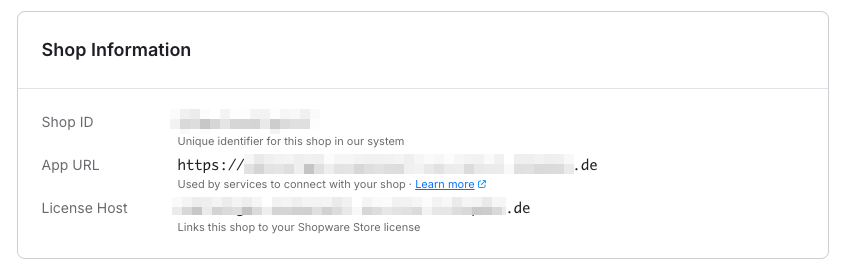
GMV Reporting in the Admin
You can find the integrated GMV reporting directly in the Shopware Admin under Settings > System > GMV Reporting. There you will get a transparent overview of the data collection status as well as the processed GMV data.
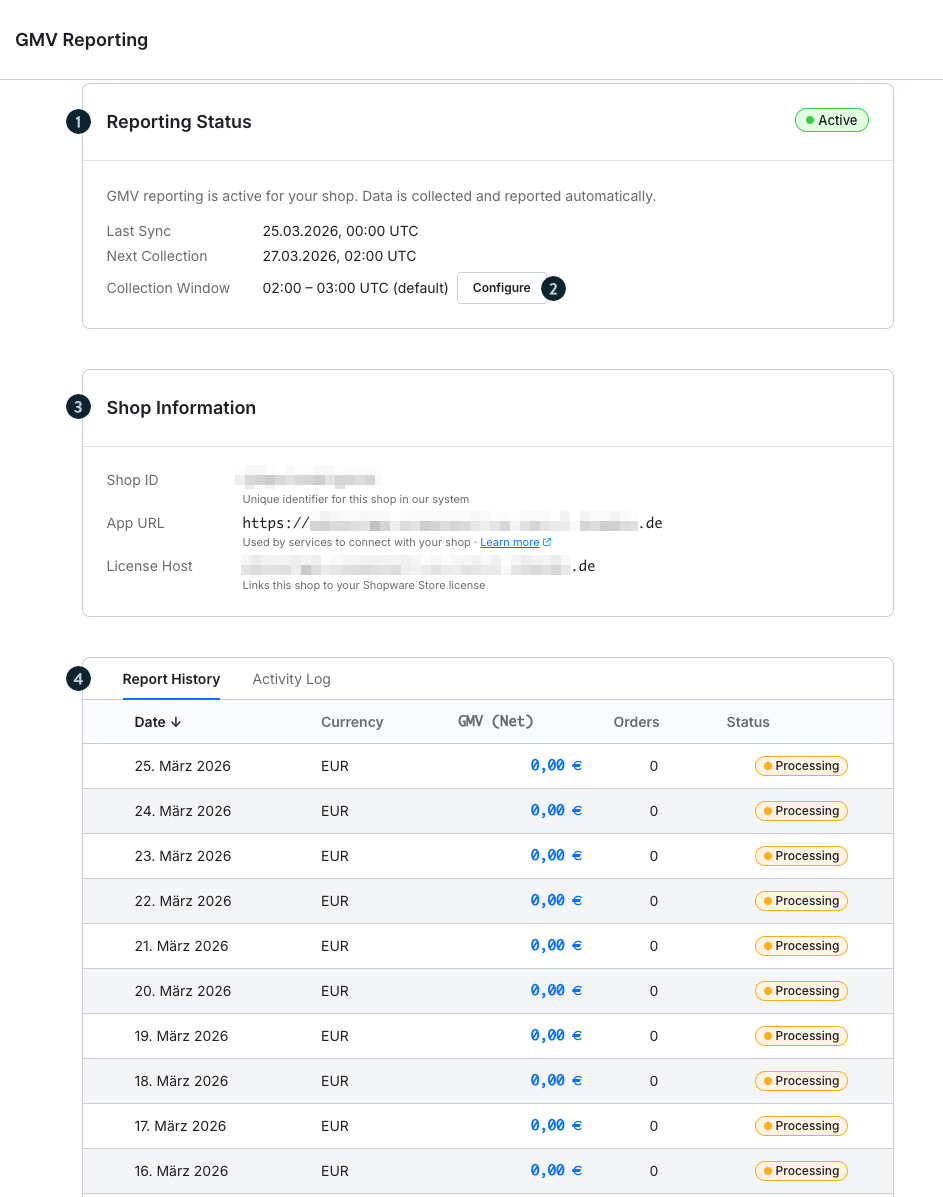
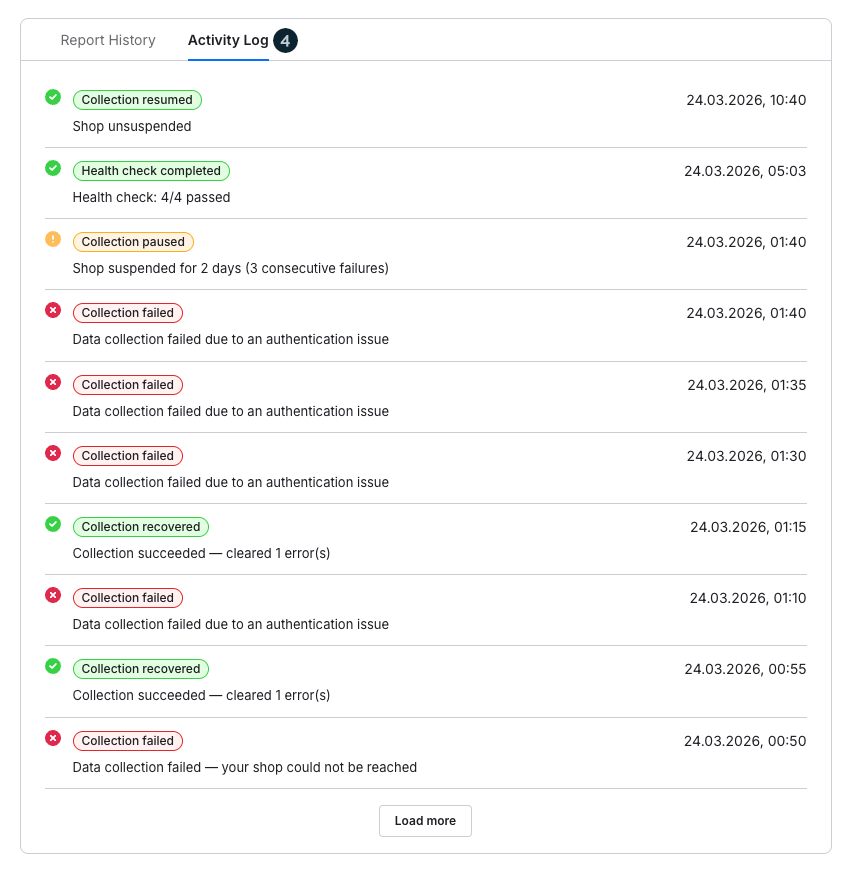
- Reporting Status (1): Here you can see whether GMV collection is active for your shop. In addition, you will see the last synchronization, the next scheduled collection, and the currently configured collection time window. Data is collected and transmitted automatically.
- Configure (2): You can adjust the collection time window if needed to best match your system environment.
- Shop Information (3): In this area you will find key technical information such as your shop ID, the configured app URL, and the license host. This information is required to correctly assign the collected GMV data to your shop.
- Report History (4): The report history shows you a daily overview of the collected GMV data. This includes currency, net GMV, and the number of orders. The respective status informs you about the current processing state.
- Activity log (4): In the activity log, you can trace the individual processing steps. This helps you better understand the processes and, if necessary, identify possible issues.
Data protection
Data handling within GMV reporting is carried out with the greatest care and in compliance with all relevant data protection requirements.
The integrated GMV reporting is designed to process only the data necessary to fulfill the contractual requirements.
Aggregated data only: Only aggregated GMV data is processed, reflecting the total revenue of your Shopware installation over a certain period as well as the number of orders. No details about individual transactions or personal data are processed or transmitted.
No access to your customer data: No access is made to personal data of your customers such as names, contact details, or individual order information. These remain entirely within the respective shop system.
Secure data transmission: GMV data is transmitted in encrypted form, so that even aggregated information is protected during transmission. GMV reporting is designed to ensure transparency and traceability while full control over all customer-related data always remains with the merchant.
FAQs
Why is GMV reporting required?
GMV reporting is an integral part of the Shopware platform and is based on the applicable contractual and legal foundations.
The collection and transmission of GMV data is automated and serves to ensure a correct and traceable basis for assignment to the respective Shopware plan. This is in line with the applicable Terms and Conditions as well as the Fair Usage Policy.
Automated processing eliminates the need for manual collection and reconciliation of GMV data. The data is processed continuously and system-side without additional operational effort.
The integration takes place entirely within the platform and is technically designed to run stably in the background without affecting existing processes.
Which data is collected?
Only aggregated data is processed, in particular:
Total revenue (GMV) over a defined period
- Number of orders
No individual transactions or personal data are collected or transmitted.
Is customer data processed or transmitted?
No. There is no access to your customers’ personal data. Information such as names, contact details, or individual order details remains entirely in your shop system.
How is the data collected?
Collection takes place automatically in the background directly within your Shopware environment. The data is processed and transmitted at regular intervals.
Is the data transmission secure?
Yes. GMV data is transmitted in encrypted form, so that aggregated information is protected at all times.
Who can I contact if I have questions?
If you have questions, issues, or individual concerns, you can always contact Support via your Shopware Account.