


Integrations
With the API in Shopware 6 you have the possibility to seamlessly connect applications and systems to Shopware.
Under Settings > System > Integrations you can create an own API access for each of your own applications you want to connect to Shopware.
You can find further information about the API in our Developer Docs: API
Create integration
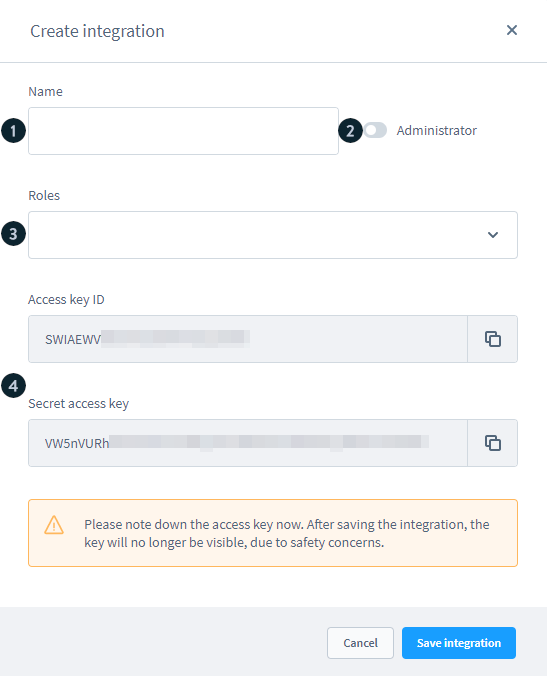
With a click on Create integration you can add a new integration. In the following, you assign a name (1) to the integration and decide whether the integration should have the permissions of the administrator (2). You can also select another role (3) in the dropdown list for the integration, if you have already defined roles here.
Finally you will receive an access ID and a security key (4) for your integration. Since the security key is only displayed here, you should save it in a safe place.
Manage integration
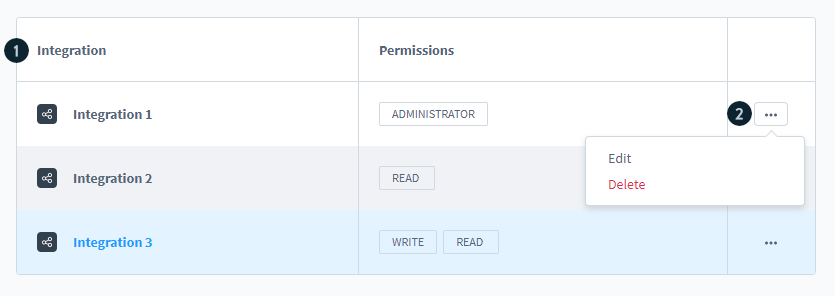
After you have created integrations, they are displayed in the overview (1) with the name and the corresponding permissions. By clicking on the name of an integration, you can edit it.
The integrations can also be edited or deleted via the context menu (2).
Edit integration
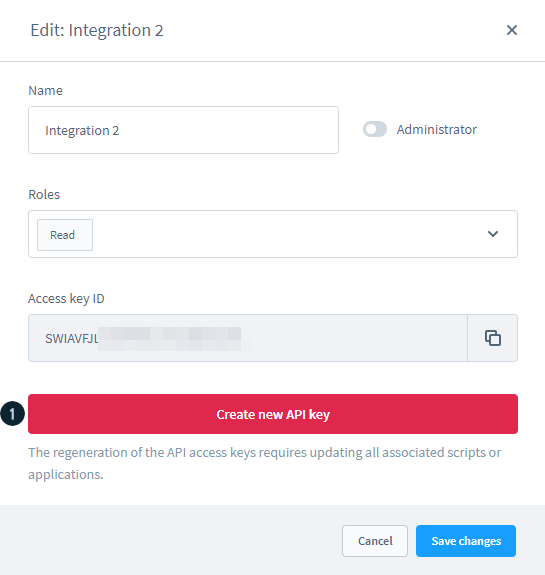
If you edit an integration afterwards, the security key is no longer displayed for security reasons. However, you can regenerate it via Regenerate API access key (1). Note that both the security key and the access ID are regenerated here.